Clean Watermarks from Partner or Vendor Images Before Publishing (Without Damaging Quality)
Introduction
A partner or vendor sent you marketing shots or photos of your products. The images are stunning… but there's an annoying detail that ruins the visuals – a watermark!
So, what do you do next? Crop it out? Use a basic eraser? Or leave it there?
The problem is, removing a watermark the wrong way can leave behind blurry patches and smudges.
The good news? You don't need complicated editing skills. In this guide, we'll show you how to remove watermarks from partner or vendor images before publishing.
Why Vendor and Partner Images Show Up with Watermarks in the First Place
You finally find the image you need. Then you open it... and there's a big watermark across the middle.
So, what happened? Did someone send you the wrong file?
Not always.
Sometimes it's just a preview
Usually, most vendors will include a preview copy of the asset with a watermark in their partner portal or press kit; primarily they do that because you want to know what it looks like, but they also want you to come back through them to get it. So, yes, the watermark will be intentional.
Maybe you selected the wrong version
Instead of downloading the correct high-resolution image, the user could easily save a preview image or even just take a screenshot of a web page. Watermarked image versions usually have a watermark because they weren't intended for publication.
What Marketing Teams Usually Do About It (And Where That Falls Short)

So, you've got a watermarked image, and the campaign is ready to go. What now?
Most teams end up doing one of these things.
Leave the watermark on
It's generally the most secure choice, if you are not certain of the usage rights.
It's still not ideal though – a prominent watermark is going to kill the look for a website, a partner page or a marketing effort that should be pristine in other ways.
Ask the vendor for a clean file
This sounds good – but only if you don't already have the approved version file yet.
The issue? Wait time. It's not always quick. You might have the file by the same day, or you might be playing the waiting game for their marketing department with your deadline quickly approaching.
Crop or cover the watermark
Need a quick fix?
A lot of people zoom into or crop the image and try to place another graphic over the watermark so people cannot see it.
In some cases that does the job, but you risk getting rid of valuable portions of the image.
Remove it without checking first
Remove it without checking first. A big No!
Don't think removing the watermark will magically fix the problem if you don't have the right to use it. Doing so may lead to larger problems down the road. First check you get the appropriate permission on an asset and then proceed with a method that effectively removes a watermark without a hassle!
Questions to Answer Before You Touch the Image
Before you start removing the watermark, take a minute to check one thing.
It only takes some time to answer these questions.
Is the watermark just a preview, or is it part of the design?
Some watermarks will appear simply because it is a preview image (e.g. For a stock photograph or logo). Other watermarks will actually be a branding/design element that cannot be removed.
If it appears to be a branding element that has been authorized, you cannot remove it.
Do you already have permission to use this image?
Think about where the image came from.
Does it come from your partner's approved library? The document they sent you when you came on board may provide guidelines, the same with your brand guide? If yes, then the mark on image might be from a preview image.
When in doubt, it's always best to ask.
Would the vendor approve the final version?
Try this little test. Would the client's marketing or brand team recognize this "edited" asset on your site today as approved?
If there's any doubt, don't guess. Ask for the official clean file instead.
By answering these three questions in under a minute, you may avoid the one important mistake: editing a picture that wasn't ever approved for final use.
Once You're Cleared to Use It: Cleaning Up the Image Properly
So, you've confirmed that you're allowed to use the image.
Now the goal is simple: remove the watermark without making it obvious that anything was edited.
Aim for a natural-looking result
A good edit won't result in weird colors, patches, and shadows of the original watermark.
If the picture is going online - to your partner pages or marketing page, -it needs to resemble the approved version, and not one that you put together at last minute.
Use the right tool for the job
It's simple to take out some watermarks just with a few clicks and even easier if the image around the watermark is just a uniform background.
However, others can become a real headache.
You'll have to be very careful if the watermark is partially covering the product, the logo, or one of the other key characteristics. You need a tool that allows you to precisely pick out what exactly you want to delete instead of having to modify the whole area.
Another plus is when the tool can restore the background so that it looks like your background is one big canvas and your removed area is just part of the background.
Cleaning lots of images?
When you're getting assets ready for a product launch, partnership directory or marketing campaign, manually cleaning images file by file soon becomes repetitive. You need a tool with batch editing!
A tool that covers both
This is exactly what Wink AI Image Watermark Remover tool can do.
This tool will remove watermarks from photo in automatic manner, but it can also let you specify the area if the watermarks are in more "difficult" places, close to logos or products. It also reconstructs the background flawlessly, and batch uploading makes cleaning an entire portfolio of photos quick work.
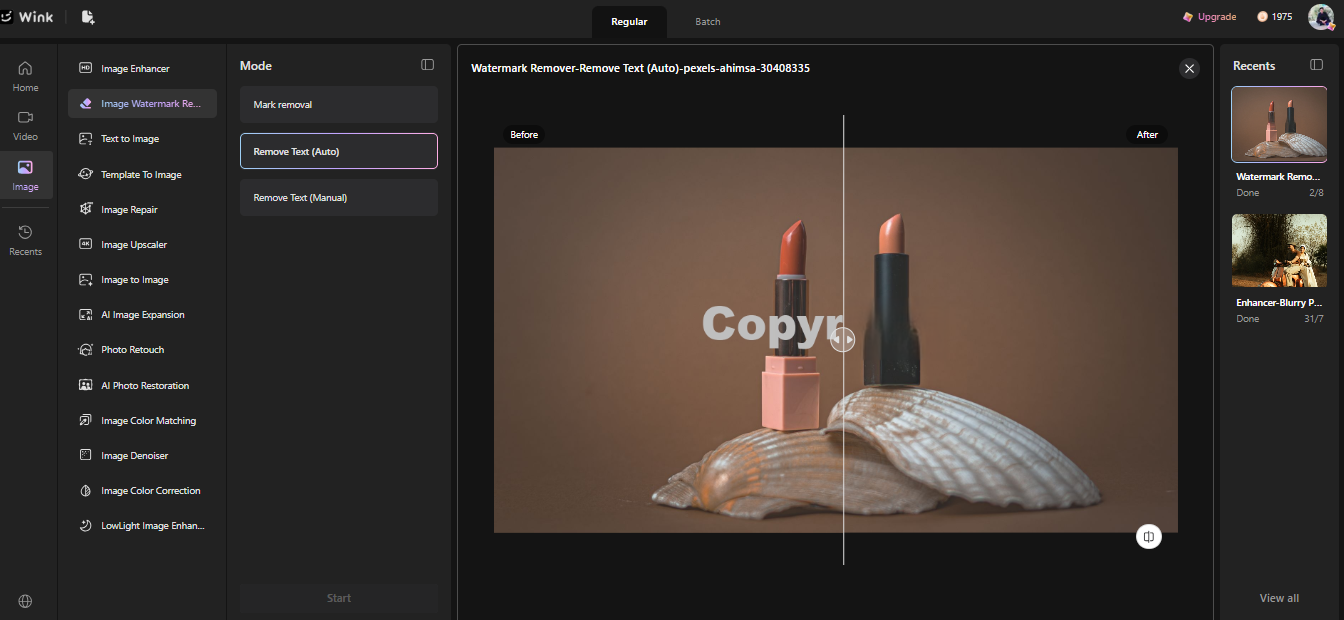
Here are the final results we got:

Final Thoughts:
Next time a partner sends over their watermark image of an approved asset, don't get stuck editing away!
Make sure you are permitted to use it and process it accordingly for best results. Yes, it will take a few additional minutes of work to achieve more authentic and professional-looking results however these will save you a whole heap more grief and stress further down the road.
If you are working within a library with already approved assets a product such as Wink AI Watermark Remover will speed up any clean up.
Until next time, Be creative! - Pix'sTory
Recommended posts
-

5 Creative Ways to Use AI Face Swap for "Internal Only" Training Videos
Read More › -

Design an App Without Code: 2026 Complete Guide
Read More › -

AI Agents in Customer Support: Faster, Smarter, Scalable
Read More › -

Why AI Voices and Avatars Are Reshaping Video Content Creation
Read More › -

How AI Video Tools Are Changing A/B Testing in Marketing
Read More › -

Krea.ai or Midjourney? Full Platform Comparison
Read More ›
