Swapping a Headline Without Breaking the Poster: Planning Precise Edits With Seedream 5.5
The first draft of a poster is rarely where my hours go. They go into round six, when the client wants a different headline, a different colour on the boat and a later sky, and nothing else to move. I am a freelance designer, and this autumn's job is a folk festival poster and its web banners. The festival, Wrayholm Folk Weekend, is made up for this article; the change requests are typical of real ones.
ByteDance released Seedream 5.5 on 9 November 2026 with a pitch aimed squarely at that sixth round: edits that leave everything you didn't mention untouched, across up to 100 rounds. I haven't put it on a client file yet. Below is my test plan, two early public tests, and some measurements on my own files.
What ByteDance claims
According to the Seed team's launch post on ByteDance's research blog, 5.5 preserves unedited regions at the pixel level and removes colour shifts in them, which is meant to support up to 100 successive edits on one image. On text, ByteDance's own evaluation across Chinese and English, including dense small text, puts the severe text corruption rate at 0.4% and the minor rate at 1.7%. Against Seedream 5.0 Pro, expert reviewers gave 5.5 a GSB preference score of +55.62% for realism in image-to-image tasks. These are the vendor's numbers from its own evaluation, and the post says a Pro version of the series will follow.
Two early tests worth looking at
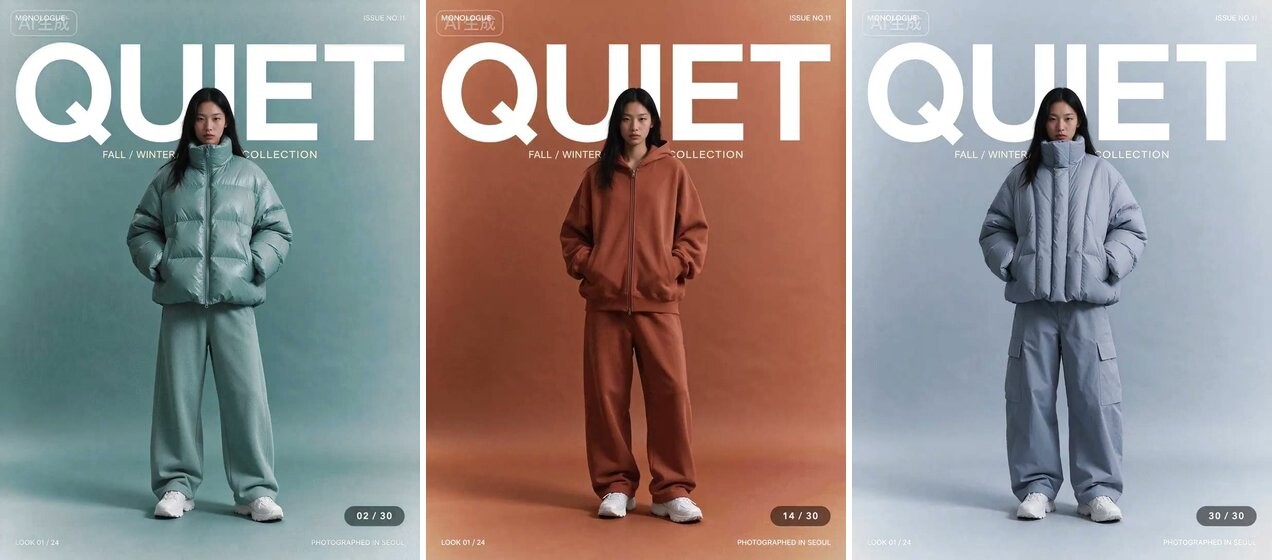
Rounds 2, 14 and 30 from the animated test @xiaohu posted on X: a fashion-magazine style cover with a large "QUIET" masthead and lines of small print. In these three frames the outfit and backdrop change while the masthead and small print stay in place. The author reports that after more than 30 rounds of edits, the people and the text, including the small text, stayed fixed in their positions.
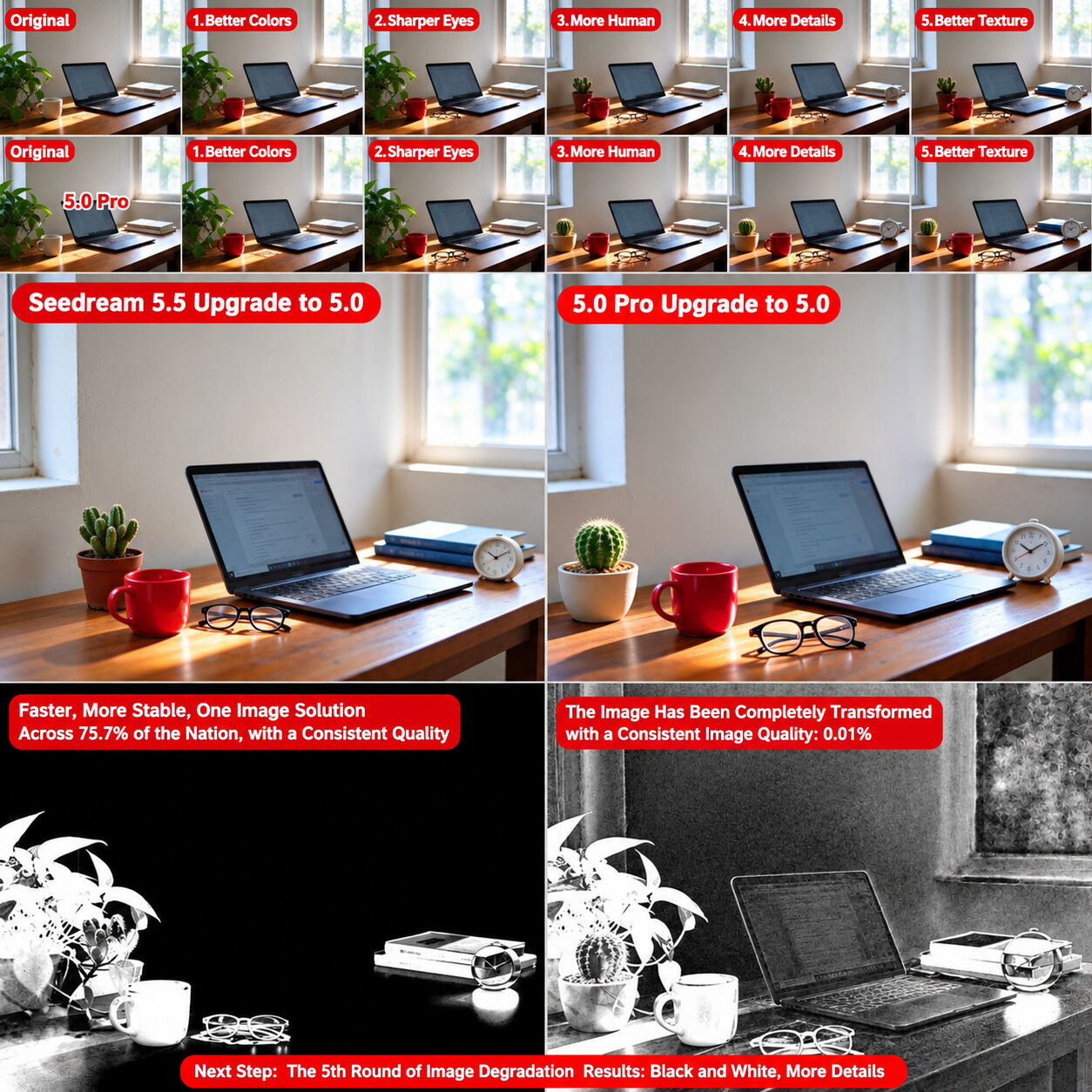
@DDJCXX's comparison on X: the same desk photo edited for five rounds in each model, one change per round (a red cup, glasses, a cactus instead of the pothos, an alarm clock, a blue book). The author reports that after five rounds in 5.5 the wall, window and laptop matched the original pixel for pixel; the difference maps along the bottom (black means unchanged) put identical pixels at 75.7% of the frame for 5.5 against 0.01% for 5.0 Pro. 5.0 Pro, by the same account, redrew the whole image each round: only 0.4% of pixels still matched after the first round, and by round five about 15% of the wall and window had changed colour.
The second test is closest to my use case, and its numbers mean different things. The identical-pixel counts are fragile: I can't tell from the post which file format each model returned, and a plain JPEG save alone changes almost every pixel by a few levels. The 15% colour shift is the number I take seriously, because a client would see it.
Measuring "nothing else moved" on my own files
Before trusting any model with a delivered design, I want a number for what changed outside the edit. I built the check on the poster itself, with no image model involved: the layout is HTML, the harbour scene is a drawn SVG, and the headline swap was made in the layout. That gives a perfect edit to calibrate against.
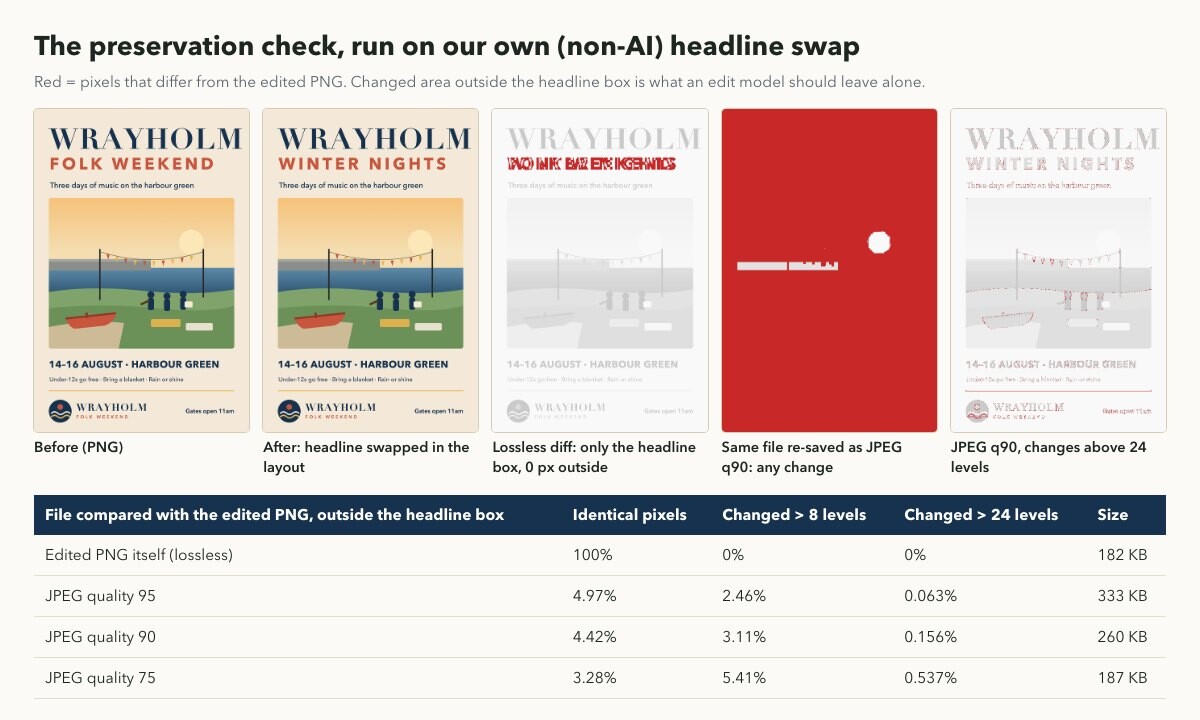
A lossless edit changes 0 pixels outside the headline box. The same file saved as JPEG at quality 90 leaves only 4.42% of those pixels identical, yet only 0.156% move by more than 24 levels.
So: compare PNG to PNG, and judge preservation with a tolerance rather than strict equality. My threshold is 24 levels on any channel, which ignores encoder noise but catches a recoloured wall. The model page lists PNG as an output format, so every round I run will be requested as PNG.
Why drift per round matters more than the first edit
A model that redraws the whole frame can look fine after one edit and still ruin a long session, because small per-round shifts compound.
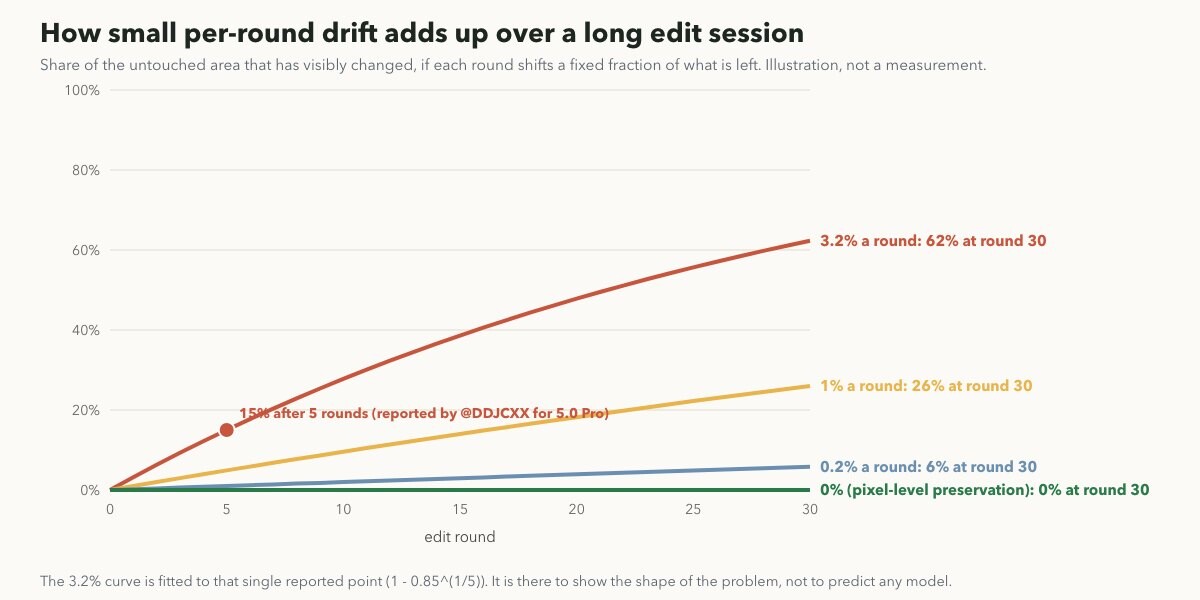
An illustration, not a measurement. The steepest curve is fitted to the single reported point of 15% after five rounds.
Fitted to that one data point, 15% after five rounds is about 3.2% a round, which would reach 62% by round 30. That is the problem "pixel-level preservation" claims to remove, and I will believe it once my own diff stays flat across a ten-round session.
Writing edits the model can't misread
Every change request on the Wrayholm poster maps to one of three edits: swap the headline, recolour one object, change the background of the photo panel. The parts that must never move are the wordmark, the date line, the small print and the logo lock-up.
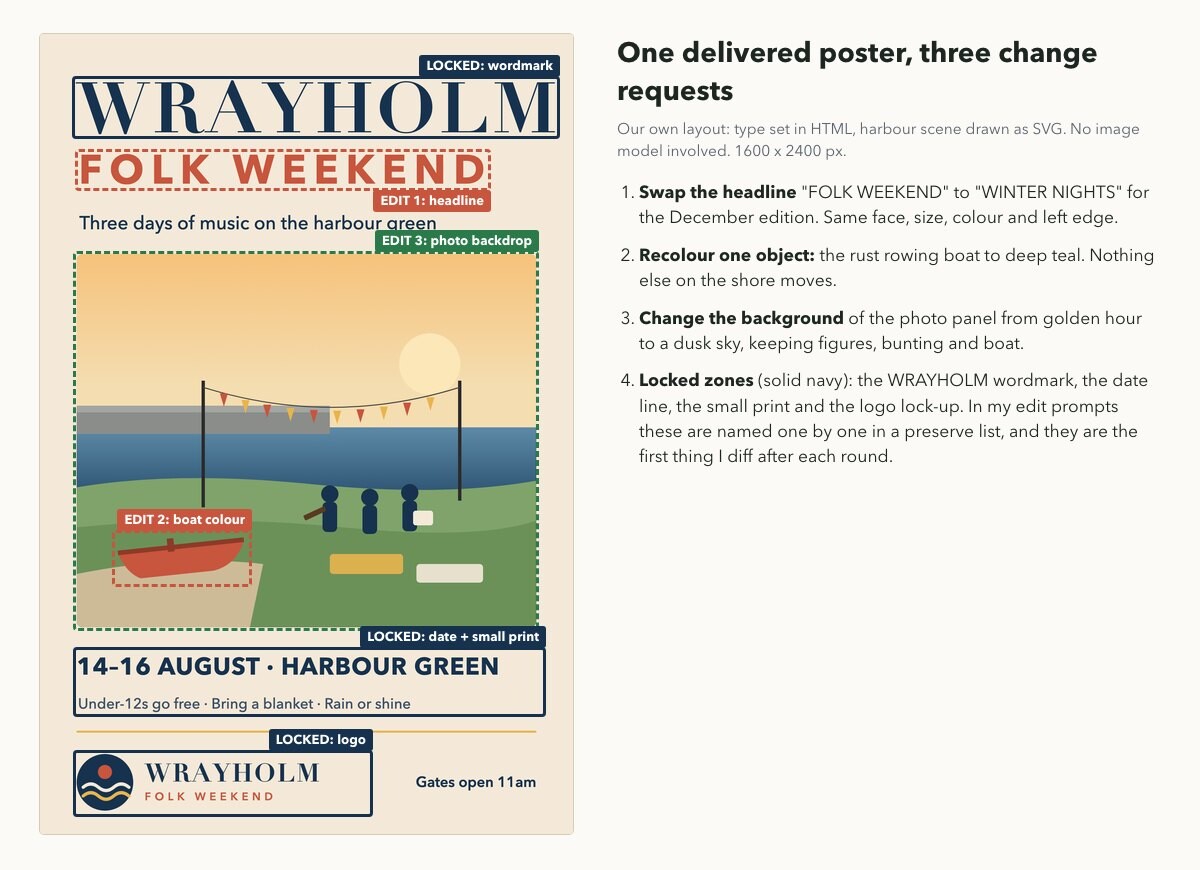
Our poster with its edit targets and locked zones. Layout and illustration made by hand for this article.
The model page's own advice matches how I already brief retouchers: quote the exact old and new text, name the location of each change, and list what to preserve. It also says not to assume any memory between calls, so each round is built from the current file. Per the page, an edit through the Seedream 5.5 image editing API is a POST /v1/images/generations with model seedream-5.5, the current poster in image_urls, a prompt, size set to auto, a resolution of 1K, 1.5K or 2K, and output_format png. You then poll GET /v1/tasks/{task_id} for the result.
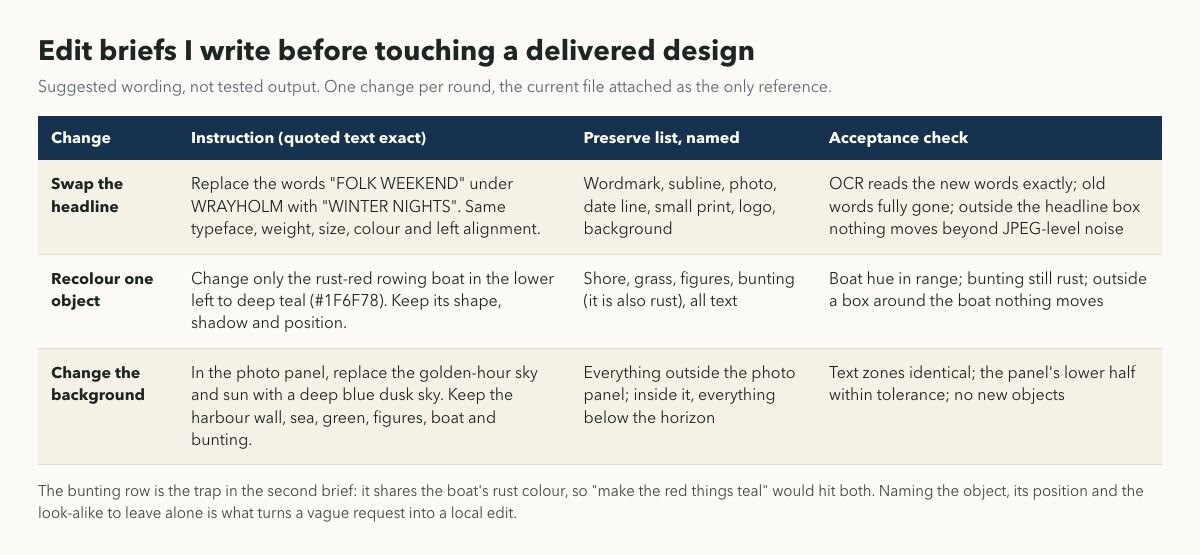
Suggested wording for each edit. These are my briefs, not tested outputs.
The recolour brief shows why the preserve list names things. The bunting shares the boat's rust colour, so "make the red things teal" would hit both; naming the look-alike also tells me where to look in the diff.
The page also documents a Split Layers mode, layer_decomposition: true, which splits one PNG or JPEG reference into a base image and transparent layers. If it returns the poster's text as its own layer, headline swaps could happen in my layout software instead of in the model. I haven't seen it run, so it stays on the test list.
Where I still finish by hand
Even if every edit claim holds, some of the poster stays manual, for reasons the model can't fix.
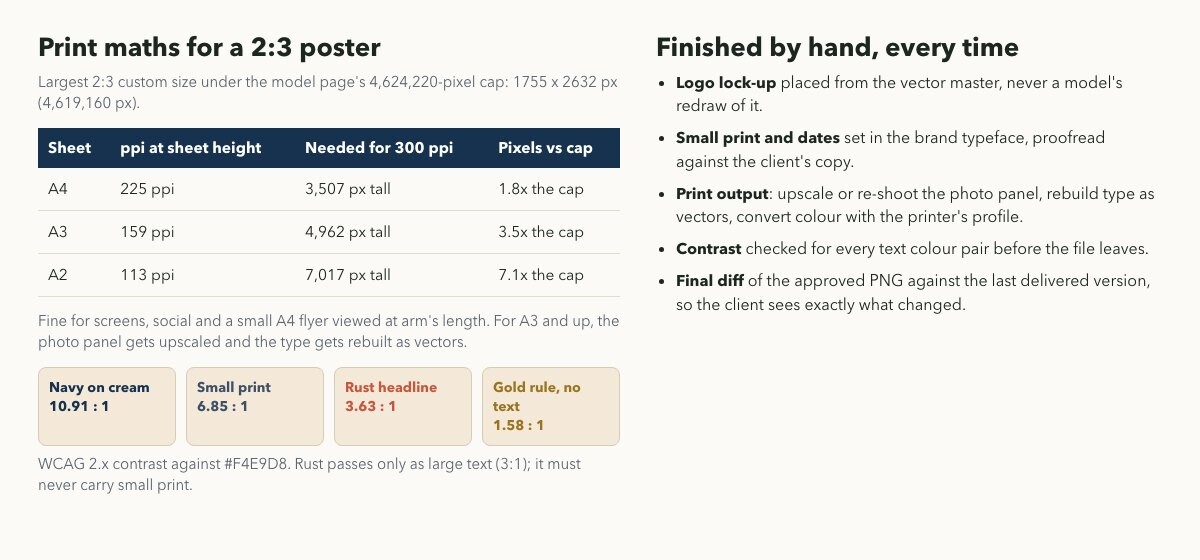
The largest 2:3 size under the page's pixel cap prints at 159 ppi on A3. Contrast ratios are measured against the poster's cream.
Resolution is the first. The model page caps custom sizes at 4,624,220 pixels, so the largest 2:3 frame is 1755 by 2632. That is plenty for the web banners and fine for an A4 flyer at 225 ppi, but an A3 poster at 300 ppi needs about three and a half times as many pixels. For print, the photo panel gets upscaled and the type is rebuilt as vectors.
Type colour is the second. Against the cream background the navy reaches 10.91:1 and the small print 6.85:1, but the rust headline colour is 3.63:1. That clears the WCAG 2.1 contrast minimum only as large text, so rust can carry a 120-pixel headline and never the small print. A model that "keeps the style" might happily reuse it for a new line of small text.
The rest is brand discipline: the logo comes from the vector master, dates and small print are set in the client's typeface, and the approved PNG is diffed against the last delivered version so the client sees exactly what changed.
My test plan for the first real job
- 1. Request PNG every round and keep every intermediate file.
- 2. One change per round, old and new text quoted exactly, preserve list named.
- 3. Diff each round against the previous one with a 24-level tolerance outside the edit box.
- 4. Read every word back, starting with dashes, middle dots and numbers.
- 5. Stop the session the first time a locked zone moves, and rebuild that part by hand.
- 6. Try Split Layers once on a delivered poster before relying on it.
Final Thoughts:
If Seedream 5.5 really leaves untouched pixels alone, it changes the economics of revision rounds more than of first drafts. The public tests so far point that way, and ByteDance's own numbers say the same. My job in the meantime is to have a diff ready to prove it on my own files, a brief that names what must not move, and a clear line where the model's output stops and print-ready finishing begins.
Until next time, Be creative! - Pix'sTory
Recommended posts
-
Making the Correct Choice for SMTP Ports 25, 465, 587, and 2525
Read More › -
How to Create a Flyer With AI That Looks Professionally Designed
Read More › -

10 Best Cold Email Agencies to Scale Your B2B Pipeline in 2026
Read More › -
YouTube Thumbnail Mistakes That Reduce Views
Read More › -
The Secret of Killer Marketing: Email and Instagram Give Benefits When Wo...
Read More › -
AI Interview Tool vs. Traditional Interview Process: Pros and Cons
Read More ›